Tenant repair reporting software
Tenant repair reporting without an app
Tenants report repairs from a link on their phone. No download, no account, no password. They answer a few plain questions and add photos or a short video, and your agency gets a complete, structured report instead of a voicemail or a vague WhatsApp.
Last updated
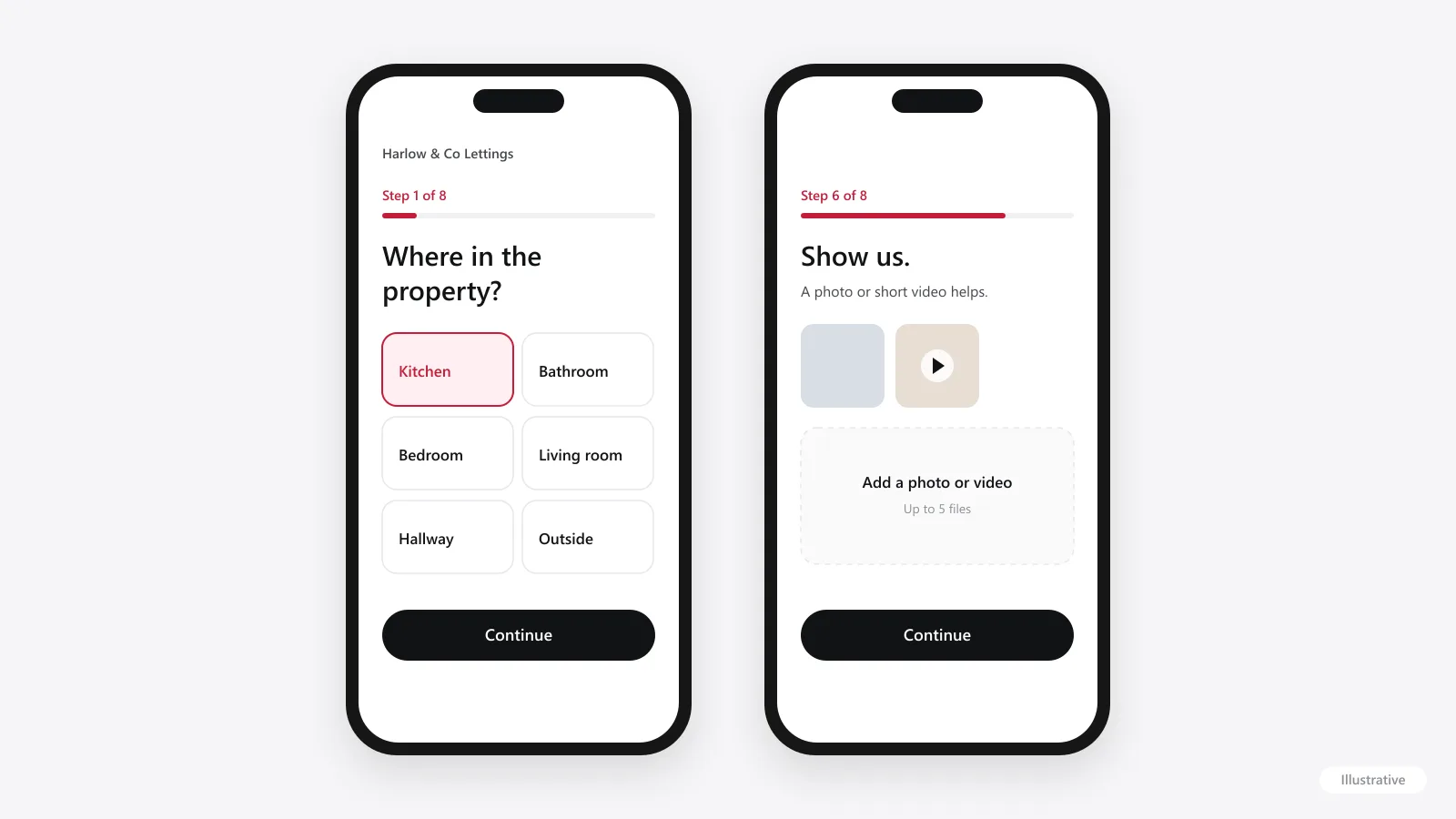
How tenants report a repair
Open the link
From an email, a text, your website or the tenancy pack. It opens in the phone’s browser, with your agency’s name on it.
Say where the problem is
Kitchen, bathroom, bedroom, living room, hallway, outside, garage or somewhere else.
Say what kind of issue it is
Plumbing, electrical, heating (boiler, radiators and hot water), structural, an appliance or security. Then a few words on what’s happening, and more detail if they want to add it.
Say how urgent it is
Routine, soon or urgent, each with a short explanation so tenants can judge it fairly.
Add photos or a video
Straight from the phone’s camera or gallery. Up to five files, and optional.
Add the address and contact details, and send
Before sending, the form tells tenants to call 999 if anyone is in danger and 0800 111 999 if they smell gas. Then the report goes straight to your agency.
There’s no account to create, no password to forget and no app to keep updated. That matters most for the tenants who report least often, who are exactly the ones who would give up at a download screen.
What your agency receives
- Property
- The address the tenant gave
- Where
- The room or area
- Issue
- The category the tenant chose
- Summary and detail
- The tenant’s own words
- Urgency
- Routine, soon or urgent
- Photos and video
- Up to five files, viewable in the report
- Tenant
- Name and contact email
- Received
- Date and time
- Every report arrives in one inbox, whichever property it’s for.
- Staff get an email when a report lands, so nothing waits to be noticed.
- Each report moves through three statuses: New, In progress and Resolved.
- You forward the report, with its photos and notes, to your own contractor.
- The same record gives you landlord-ready information when you update the landlord.
That last step is where structured intake pays off twice. The details the tenant gives are the details the landlord needs, so our landlord maintenance reports page shows how a report becomes a clear landlord update.
Why a link beats phone, email and WhatsApp
| Phone | Tenote link | |||
|---|---|---|---|---|
| Same questions every time | Depends who answers | No | No | Yes |
| Photos and video with the report | No | Sometimes | Sometimes, in separate messages | Yes |
| Urgency captured | If someone asks | Rarely | Rarely | Yes |
| Arrives in one place | A notebook or a call log | Several inboxes | Personal phones | One agency inbox |
| Works out of hours | Only with cover | Yes, but unread | Yes, but unread | Yes, ready in the morning |
None of this stops tenants calling when they need to. When they do, reply with the link so the details end up in the same place. Our guide to cutting maintenance admin covers the wider workflow.
Photos and video
Tenants can add up to five photos or short videos to a report, up to 20 MB each. Photos can be JPG, PNG or HEIC, the format iPhones use, and videos MP4, MOV or WebM.
A short video is often the clearest way to show a leak, a noise or an intermittent fault. It helps your team decide how urgent the repair is, and helps your contractor turn up with the right parts. When you tell tenants about the link, it’s worth suggesting what to capture:
- A wide shot that shows where the problem is in the room.
- A close-up of the damage, leak or fault.
- Any error code or display on a boiler or appliance.
- For a leak or a noise, a short video rather than a photo.
How urgent is it?
Tenants choose routine, soon or urgent. That’s a guide, not a decision: your team reviews each report and decides how to respond, the same way you would after a phone call. Our journal guide to emergency, urgent and routine repairs sets out how agencies commonly draw the lines.
Getting tenants to use it
A reporting link only helps if tenants know about it. The agencies that get the most from it make it the obvious route:
- Email and text the link to every tenant when you start.
- Add it to tenancy packs, move-in emails and your website.
- Put it in staff email signatures and on your voicemail message.
- When a repair comes in by phone or WhatsApp, reply with the link so the details arrive complete.
- Use the free month properly: send the link early, because a quiet trial won’t tell you much.
Data and privacy
Reports are stored in the UK and EU, with some processing by US suppliers under standard safeguards. Tenant report pages don’t run analytics. The privacy policy explains what is collected and why, and the form links to it before tenants send a report.
Questions
Do tenants need an app or an account?
No. Tenants report from a link in their phone’s browser or on a computer. There’s no download, no account and no password.
Can tenants send photos and videos?
Yes. Up to five photos or short videos per report, up to 20 MB each.
Can tenants report repairs out of hours?
Yes, the link takes reports at any time. Tenote isn’t an emergency service, though: the form tells tenants to call 999 if anyone is in danger and 0800 111 999 if they smell gas, and your own out-of-hours arrangements apply.
Does the page show our agency’s name?
Yes. Each agency has its own reporting link with the agency’s name on it, so tenants know who they’re reporting to.
Do tenants get updates on their repair?
When the report is sent, tenants see that it has been received and that their property manager has been notified. Your agency follows up as it normally would; there’s no tenant tracking page.
How much does it cost?
£89 a month, flat, with no VAT to add. Unlimited properties and reports, and the first month is free.